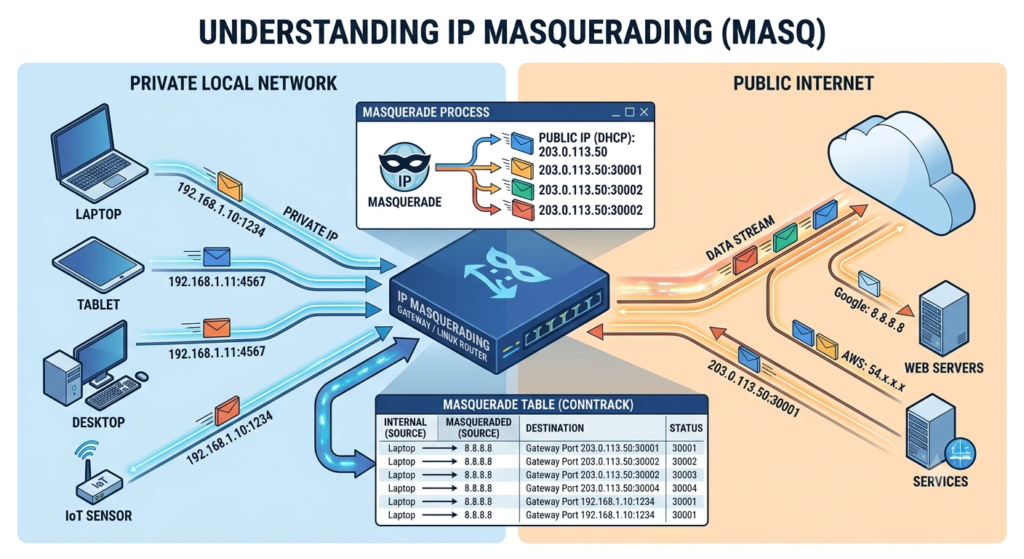
If you’ve ever set up a Raspberry Pi as a home router, shared a Wi-Fi hotspot from a laptop’s Ethernet connection, or wondered how a Kubernetes node lets pods reach the internet through a single external address, you’ve relied on IP masquerading — even if nothing on screen ever called it that.
IP masquerading is Linux’s dynamic form of Network Address Translation (NAT). It rewrites the source address of outgoing packets so that traffic from many internal, privately-addressed machines appears to originate from a single public IP — the one currently assigned to the router’s outbound interface. When replies come back, the kernel automatically reverses the rewrite and delivers each packet to the correct internal host.
The “masquerade” name is deliberate: unlike a static NAT rule, which permanently maps traffic to one fixed public address you specify, masquerading asks no questions about what that address is. It simply grabs whatever IP is currently bound to the outbound interface at the moment a packet leaves. That single behavioral difference is what makes it the default choice for routers on DHCP connections, cloud instances with ephemeral public IPs, VPN gateways, and container networking — anywhere the “public” side of the connection isn’t guaranteed to stay the same.
This post walks through how IP masquerading actually works at the packet level, how it differs from static SNAT and from DNAT/port forwarding, how to configure it with both iptables and nftables, and the pitfalls that trip people up — forgetting IP forwarding, firewall ordering, and IPv6 blind spots chief among them.
The core idea: rewrite-and-remember
Every device on a private LAN — say 192.168.1.0/24 — has an address that is meaningless outside that network. Internet routers won’t forward packets addressed from 192.168.1.10; that range is reserved by RFC 1918 and never routed publicly. So before a packet leaves the LAN, something has to swap the private source address for a real, routable one. That’s the “translation” in Network Address Translation.
What makes masquerading work as more than a one-way rewrite is connection tracking (conntrack). When the Linux kernel masquerades an outgoing packet, it doesn’t just change the source IP — it records an entry in an in-memory table: original source IP and port, original destination, the new (masqueraded) source port it assigned, and a timeout. When a reply arrives from the internet, the kernel looks up that reply against the conntrack table, finds the matching entry, and rewrites the destination address back to the correct internal host and port before forwarding it onward. From the LAN host’s point of view, it sent a packet and got a reply — the translation is invisible.
This is also why masquerading can safely multiplex many internal hosts behind one public IP: each outbound connection gets assigned a distinct source port on the public side (even if two internal hosts happen to use the same source port internally), so the conntrack table can always disambiguate which reply belongs to which internal host. A home router with fifty devices and one public IPv4 address is running exactly this trick, tens of thousands of times a day.
Masquerading vs. static SNAT vs. DNAT
These three terms get conflated constantly, so it’s worth being precise, because the fix for a broken NAT setup is usually “you used the wrong one of these.”
MASQUERADE
Rewrites the source address to whatever IP is currently bound to the outbound interface. No IP is specified in the rule. Ideal when the public IP can change — DHCP WAN connections, cloud instances, dial-up/PPPoE links, failover interfaces.
Static SNAT
Rewrites the source address to a specific IP you hardcode in the rule. Slightly more efficient (the kernel doesn’t need to re-check the interface’s live address per packet) but breaks silently if that IP is reassigned or the interface goes down and comes back with a different address.
DNAT (port forwarding) is the mirror image of both: it rewrites the destination address of incoming packets, typically to expose an internal service (like a web server on 192.168.1.20:80) to the outside world via the router’s public IP and a chosen port. Masquerading handles outbound traffic leaving the LAN; DNAT handles inbound traffic being routed to a specific internal host. A typical home router config uses masquerading for all outbound LAN traffic and a handful of DNAT rules for services you want exposed.
ISP renews the DHCP lease overnight and hands out a new public IP: 203.0.113.9
Static SNAT has to be manually updated (or scripted) every time the underlying address changes.
ISP renews the DHCP lease overnight and hands out a new public IP: 203.0.113.9
This is precisely why MASQUERADE, not SNAT, is the default on consumer routers and cloud NAT instances.
Prerequisites: IP forwarding must be on
A NAT rule alone does nothing if the kernel isn’t willing to forward packets between interfaces in the first place. By default, a Linux host treats itself as an endpoint, not a router, and drops any packet that arrives on one interface addressed to a destination reachable only through another. You have to explicitly enable forwarding before masquerading has anything to act on.
# enable immediately (resets on reboot)
echo 1 | sudo tee /proc/sys/net/ipv4/ip_forward
# persist across reboots
echo 'net.ipv4.ip_forward = 1' | sudo tee /etc/sysctl.d/99-ip-forward.conf
sudo sysctl --system
cat /proc/sys/net/ipv4/ip_forward returns 1 before debugging the firewall rules themselves.Setting it up with iptables
The classic approach uses the nat table’s POSTROUTING chain — the last point a packet passes through before leaving the box, which is exactly where source rewriting needs to happen.
# masquerade all traffic leaving via eth0 (the WAN/uplink interface)
sudo iptables -t nat -A POSTROUTING -o eth0 -j MASQUERADE
# allow forwarded traffic from LAN (eth1) out to WAN (eth0)
sudo iptables -A FORWARD -i eth1 -o eth0 -j ACCEPT
# allow established/related return traffic back in
sudo iptables -A FORWARD -i eth0 -o eth1 -m state --state ESTABLISHED,RELATED -j ACCEPT
# persist rules (Debian/Ubuntu)
sudo apt install iptables-persistent
sudo netfilter-persistent save
Scoping the rule to -o eth0 matters — an unscoped MASQUERADE rule will rewrite the source of any forwarded packet leaving on any interface, which is rarely what you want on a box with more than two NICs.
Setting it up with nftables
Most current distributions (Debian 11+, Ubuntu 20.04+, RHEL 8+, Fedora) ship nftables as the default backend, with iptables commands translated underneath via iptables-nft. Writing native nftables syntax gives you a cleaner, atomic ruleset.
sudo nft add table ip nat
sudo nft add chain ip nat postrouting { type nat hook postrouting priority 100 \; }
sudo nft add rule ip nat postrouting oifname "eth0" masquerade
# forwarding rules, filter table
sudo nft add table ip filter
sudo nft add chain ip filter forward { type filter hook forward priority 0 \; policy drop \; }
sudo nft add rule ip filter forward iifname "eth1" oifname "eth0" accept
sudo nft add rule ip filter forward ct state established,related accept
# save persistently
sudo nft list ruleset | sudo tee /etc/nftables.conf
sudo systemctl enable --now nftables
If your distro uses firewalld instead of raw nftables/iptables management, masquerading is a one-line zone setting:
sudo firewall-cmd --zone=external --add-masquerade --permanent
sudo firewall-cmd --reload
firewalld’s --add-masquerade is itself just a friendly wrapper that installs the equivalent nftables MASQUERADE rule for that zone — worth knowing when you need to debug what it actually produced with firewall-cmd --direct --get-all-rules or by inspecting nft list ruleset.
Verifying it’s actually working
Once rules are in place, confirm both the rewrite and the tracking are happening as expected:
# from a LAN client, check what IP the outside world sees
curl ifconfig.me
203.0.113.5
# on the router, watch active translated connections
sudo conntrack -L | grep MASQUERADE
# or without the conntrack tool
cat /proc/net/nf_conntrack | head
If curl ifconfig.me from the LAN client returns the router’s public IP rather than an error, masquerading and forwarding are both functioning correctly end to end.
| Approach | Adapts to IP changes | Best for | Config effort |
|---|---|---|---|
| MASQUERADE | Yes, automatically | DHCP/dynamic WAN, cloud instances, VPN gateways, containers | One rule, no address to maintain |
| Static SNAT | No — breaks on change | Fixed/static public IP, high packet-rate NAT where the small lookup savings matter | One rule, must track current IP |
| firewalld masquerade | Yes (delegates to MASQUERADE) | RHEL/Fedora/openSUSE hosts already zone-managed by firewalld | Single command, zone-scoped |
| DNAT / port forwarding | N/A — inbound direction | Exposing an internal service to the internet | One rule per exposed port/service |
Where masquerading shows up beyond home routers
Once you know the pattern, you’ll recognize it everywhere in Linux infrastructure:
Docker and container networking — Docker’s default bridge network gives every container a private IP and installs a MASQUERADE rule so containers can reach the internet through the host’s address, without the host needing to know or care about individual container IPs.
Kubernetes — kube-proxy and CNI plugins commonly masquerade pod-to-external traffic (often controlled by a --masquerade-all or non-masquerade CIDR setting) so that traffic leaving the cluster carries a node’s routable IP rather than an internal pod CIDR address that upstream networks wouldn’t know how to route back to.
Cloud NAT gateways — AWS NAT Gateway, GCP Cloud NAT, and similar managed services are, at the packet level, doing the same source-rewrite-and-track job as a Linux box running MASQUERADE, just implemented at cloud-provider scale with their own IP pools.
VPN and site-to-site tunnels — when a VPN server needs to let tunnel clients reach the wider internet (not just internal resources), masquerading on the server’s outbound interface is the standard mechanism, since the client’s tunnel IP is meaningless outside the VPN.
Pitfalls and best practices
Pitfall Forgetting ip_forward — covered above, but it’s the single most common cause of “masquerading isn’t working” reports.
Pitfall Rule ordering — in iptables, a DROP rule earlier in the FORWARD chain can silently discard traffic before it ever reaches your ACCEPT rule. Use iptables -L FORWARD -v -n --line-numbers to check ordering, or in nftables rely on chain priorities rather than manual ordering assumptions.
Pitfall IPv6 blind spot — MASQUERADE historically applied to IPv4 only, and many home/edge setups still don’t NAT IPv6 at all (relying instead on native routing and a firewall). If your network is dual-stack, make sure you’ve deliberately decided whether IPv6 needs equivalent handling — ip6tables -t nat and nftables’ ip6 family both support masquerade if you need it.
Practice Scope MASQUERADE rules to a specific output interface (-o eth0 / oifname "eth0") rather than leaving them interface-agnostic, especially on multi-homed hosts.
Practice Persist your ruleset explicitly — a rule added with iptables or nft add vanishes on reboot unless saved via netfilter-persistent, an nftables config file loaded by systemd, or firewalld’s --permanent flag.
Practice Keep the FORWARD chain’s default policy at DROP and explicitly allow only the traffic you intend to route, rather than defaulting to ACCEPT and trying to block exceptions after the fact.
Frequently Asked Questions
What’s the actual difference between IP masquerading and SNAT?
Masquerading is a special case of SNAT that doesn’t require you to specify the source IP — it reads whatever address is currently bound to the outbound interface at packet time. Static SNAT requires a hardcoded IP and breaks if that address ever changes, while masquerading adapts automatically, at a small extra per-packet cost.
Do I need to enable IP forwarding separately from setting up masquerading?
Yes. Masquerading only rewrites addresses on packets the kernel is already willing to forward. Without net.ipv4.ip_forward = 1 set via sysctl, the host won’t route traffic between interfaces at all, and the NAT rule never gets a chance to act.
Does IP masquerading work with IPv6?
It can — both ip6tables and nftables support a masquerade action in the IPv6 NAT context — but many networks intentionally skip NAT for IPv6 since address space isn’t scarce, relying on native routing plus firewall rules instead. Whether you need it depends on whether your internal IPv6 addressing is meant to be globally routable or kept private.
Can many devices really share one public IP without conflicts?
Yes. Each outbound connection is tracked in the kernel’s conntrack table and assigned a distinct source port on the public side if needed, so replies can always be matched back to the correct internal host and port. This is exactly what lets dozens of home network devices operate simultaneously behind a single ISP-assigned address.
How does masquerading relate to port forwarding (DNAT)?
They handle opposite directions of traffic. Masquerading rewrites the source address of outbound packets so internal hosts can reach the internet. DNAT (port forwarding) rewrites the destination address of inbound packets so external clients can reach a specific internal service. A typical router runs both at once.
Why did masquerading stop working after my ISP renewed my DHCP lease?
If it actually stopped working after an address change, you likely have a static SNAT rule rather than a true MASQUERADE rule — SNAT hardcodes the public IP and needs updating whenever the address changes, while MASQUERADE re-reads the interface’s current address automatically and shouldn’t be affected.
Do I still need to understand this if I use firewalld or a cloud NAT gateway?
It’s worth knowing at least the concept, since firewalld’s --add-masquerade and cloud NAT gateways are implementing the same rewrite-and-track mechanism under a friendlier interface. Understanding the underlying model makes it much faster to diagnose connectivity issues when the managed abstraction doesn’t behave the way you expect.
Is IP masquerading secure by default?
Masquerading itself only rewrites addresses — it isn’t a firewall. Internal hosts behind it are shielded from unsolicited inbound connections simply because there’s no conntrack entry for traffic that wasn’t initiated outbound, which incidentally behaves like a basic firewall. But you should still maintain explicit FORWARD chain rules and not rely on NAT as your only line of defense.
Final thoughts
IP masquerading is one of those pieces of Linux networking that’s simple in concept — rewrite the source address, remember the mapping, rewrite it back on the way in — but shows up under the hood of an enormous amount of infrastructure, from a spare Raspberry Pi acting as a home gateway to the NAT layer inside a Kubernetes cluster. The key thing to internalize is the one property that separates it from static SNAT: it always uses whatever address the outbound interface currently holds, which is exactly why it’s the correct default whenever that address isn’t guaranteed to stay fixed.
If you take away one operational habit from this post, make it this: when NAT “isn’t working,” check ip_forward first, check your FORWARD chain policy and ordering second, and only then start doubting the MASQUERADE or SNAT rule itself. In the overwhelming majority of real-world cases, that order finds the problem fastest.